
Audit Logs
Audit Logs provide a detailed record of all changes made to your Racks and applications through the Convox API. Every write operation, including deployments, environment variable changes, scaling updates, and infrastructure modifications, is captured with contextual metadata.
Audit Logs are available on Pro and Enterprise Console plans.
Accessing Audit Logs
You can view audit logs in the Console by navigating to the Audit Log tab of your organization. The audit log displays events in reverse chronological order.
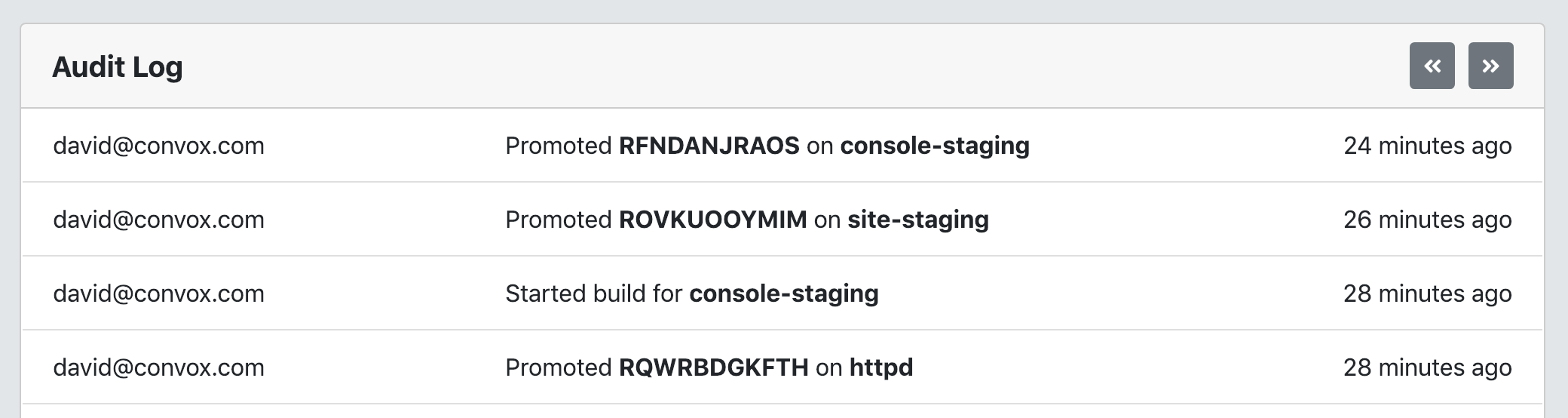
Tracked Events
Audit Logs capture all write operations proxied through the Console to your Racks, including:
| Category | Events |
|---|---|
| Applications | App creation, app deletion |
| Builds | Build creation, build log access |
| Environment | Environment variable updates |
| Releases | Release creation, release promotion |
| Processes | Formation changes (scaling), one-off process execution |
| Infrastructure | Instance termination, SSH access, system parameter updates |
| Security | SSL certificate changes, key rotation |
| Registries | Private registry addition and removal |
Read-only operations (listing apps, viewing logs) are not recorded in the audit log.
Event Data
Each audit log entry includes:
| Field | Description |
|---|---|
| Timestamp | UTC time of the event |
| User | Email of the user who performed the action (or API key name if performed via deploy key) |
| Rack | The Rack where the action occurred |
| Action | Human-readable description of what changed |
For interactive sessions (SSH, convox exec), the Console also records terminal session captures that can be replayed.
Filtering
You can filter audit log entries by:
- User: Show events from a specific team member
- Rack: Show events from a specific Rack
- Action: Show specific types of events (created, deleted, promoted, updated)
Combine filters to narrow results. For example, filter by a specific user and Rack to see all changes that person made to a particular environment.
Shareable Audit Log Links
Organization administrators can generate shareable audit log URLs for external review (compliance audits, incident investigations). When creating a shareable link, you can configure:
- Filter: Pre-apply user, Rack, or action filters
- Time range: Limit to events within a specific window
- Expiration: Set an expiration date for the link (or make it permanent)
Shareable links use a signed token and do not require Console authentication.
See Also
